Wednesday, March 27, 2013

Key Limitations of Using PerformancePoint Services

This is true for both SharePoint 2010 and SharePoint 2013 when we are creating analytical charts, :-
i. We are limited to the type of charts that can be created in PPS


ii. We are not able to perform further customization or “touch ups” such as changing colors and adding descriptions to the axis. Everything is automatically generated and cannot be modified.


iii. Analytical charts can only be created if we use MS SQL Server Analysis Services as the data source.


iv. Details are not displayed on the chart. You have to hover over the sections. However you will not be able to see complete details at on glance.


PieChart

Monday, March 11, 2013

Dashboard Designer 2013 Issue - Authentication Error

I got this error when trying to create a PerformancePoint item in SharePoint 2013.

" The remote server returned an error: (401) Unauthorized."

DD_Error1Capture

and this post (workaround) saved my day :-).

http://social.msdn.microsoft.com/Forums/sk-SK/sharepointgeneralprevious/thread/90cb879e-1323-4e70-a2fc-1c45d6b0a756


Thursday, February 14, 2013

Bypassing security trimming in SharePoint

I had a requirement to allow users to search for documents that they don't have access and found this artice:-

http://social.msdn.microsoft.com/Forums/en/sharepointsearch/thread/b2914bae-a8f1-405d-bbb3-3fc7134a9f4b

However, when do some testing to validate the above, I found that it is not working. Reason being, MS Search has security trimming during query  itself.

I still haven't found any workaround for this.

Tuesday, February 5, 2013

SQL 2012 Improvements

A good read @ http://www.sharepointjoel.com/Lists/Posts/Post.aspx?ID=481


and


@http://blogs.technet.com/b/dataplatforminsider/archive/2011/11/01/my-top-5-sql-server-2012-features-by-aaron-bertrand-guest-blogger.aspx

Thursday, January 31, 2013

Default authentication in SharePoint 2013 is claims

I just found out that Classic based authentication is deprecated in SharePoint 2013.

Read here for details: http://www.wictorwilen.se/sharepoint-2013-claims-is-the-new-black

It was written during SP 2013 preview but I guess it is true well: http://technet.microsoft.com/en-us/library/jj219758.aspx

And how to check if your current web app is using which method ? 2 ways

Through UI : http://www.enjoysharepoint.com/Forum/Details/how-to-check-if-your-sharepoint-2010-web-application-uses-339.aspx

Using powershell : http://www.fewlines4biju.com/2012/08/how-to-check-if-your-sharepoint-2010.html

Wednesday, January 23, 2013

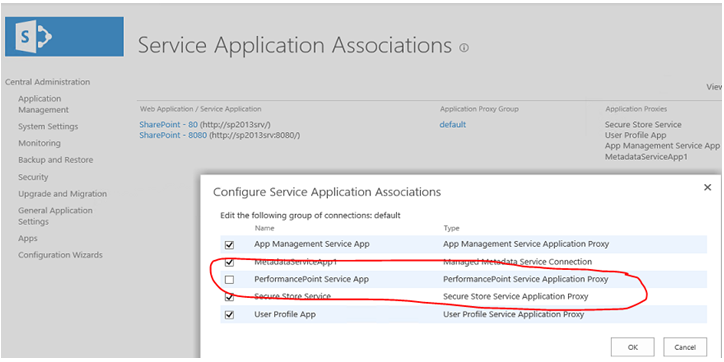
Error when trying to create a new Data Source (Data Connection) in PerformancePoint

If you get an error while trying to select a data source is Dashboard Designer, that may be because you have not associate the PerformancePoint Service App to the Web Application which hosts your site collection.


Capture1


Capture2

Thursday, January 10, 2013

Internet Explorer 10 doesn't like SharePoint 2010

Well that's by default. You won't be able to do a few things on your IE10 when you access a SharePoint 2010 site.

To make it "like" SharePoint, you can add the SharePoint 2010 sites in the "Compatibility View Settings" of you IE10.

Steps:-

1. On your IE, go to Tools -> Compatibility Settings
2. Key in the "SharePoint site url" (if its not there) in the "Add this website" box
3. Click Add, then Close.
4. Refresh you page or restart IE.