I just found out that Classic based authentication is deprecated in SharePoint 2013.
Read here for details: http://www.wictorwilen.se/sharepoint-2013-claims-is-the-new-black
It was written during SP 2013 preview but I guess it is true well: http://technet.microsoft.com/en-us/library/jj219758.aspx
And how to check if your current web app is using which method ? 2 ways
Through UI : http://www.enjoysharepoint.com/Forum/Details/how-to-check-if-your-sharepoint-2010-web-application-uses-339.aspx
Using powershell : http://www.fewlines4biju.com/2012/08/how-to-check-if-your-sharepoint-2010.html
Thursday, January 31, 2013

Wednesday, January 23, 2013
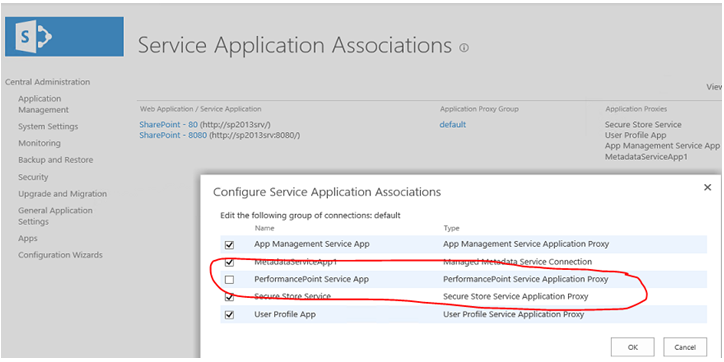
Error when trying to create a new Data Source (Data Connection) in PerformancePoint
If you get an error while trying to select a data source is Dashboard Designer, that may be because you have not associate the PerformancePoint Service App to the Web Application which hosts your site collection.


Thursday, January 10, 2013
Internet Explorer 10 doesn't like SharePoint 2010
Well that's by default. You won't be able to do a few things on your IE10 when you access a SharePoint 2010 site.
To make it "like" SharePoint, you can add the SharePoint 2010 sites in the "Compatibility View Settings" of you IE10.
Steps:-
1. On your IE, go to Tools -> Compatibility Settings
2. Key in the "SharePoint site url" (if its not there) in the "Add this website" box
3. Click Add, then Close.
4. Refresh you page or restart IE.
To make it "like" SharePoint, you can add the SharePoint 2010 sites in the "Compatibility View Settings" of you IE10.
Steps:-
1. On your IE, go to Tools -> Compatibility Settings
2. Key in the "SharePoint site url" (if its not there) in the "Add this website" box
3. Click Add, then Close.
4. Refresh you page or restart IE.
Thursday, September 20, 2012
Microsoft.SharePoint.Administration.SPUpdatedConcurrencyException
I got this error while trying to run psconfig. Tried IISRESET and even rebooting the server but they didn't help. After searching around, found this article - http://www.sharepointgeoff.com/spupdatedconcurrencyexception-fix-when-trying-to-install-june-2011-cu-for-sharepoint-server/
I didnit install the CU but still get this error and the steps mentioned below helped to make sure the psconfig completed successfully.
1. stsadm -o setproperty -pn command-line-upgrade-running -pv No
2. IISReset
3. Restart the Windows SharePoint Timer
4. psconfig –cmd upgrade –inplace b2b –wait –force
I didnit install the CU but still get this error and the steps mentioned below helped to make sure the psconfig completed successfully.
1. stsadm -o setproperty -pn command-line-upgrade-running -pv No
2. IISReset
3. Restart the Windows SharePoint Timer
4. psconfig –cmd upgrade –inplace b2b –wait –force
Thursday, August 9, 2012
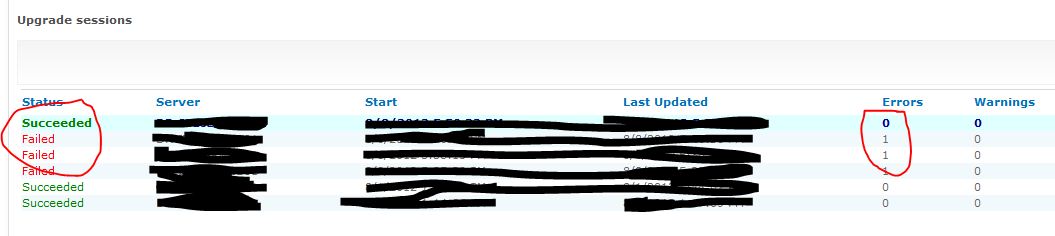
Error while running PSCONFIG in SharePoint 2010
When we are applying SP1 or any other patches, we need to run psconfig command to update the SharePoint databases. Installing the patches only installs the binaries on the SharePoint server. After installing the patch, we need to synch up with the SharePoint database. That is where we need PSCONFIG.
However, due to some reason, you may encounter some issue. Log file may not be that informative. One possible cause of upgrade (when you run psconfig, it upgrades the database with some details) error is that features didn't get installed properly or got messed up when you apply a patch.
If you get error running psconfig, try the below. It helped for us. By the way, make sure you are running this command using your farm account.
PSConfig.exe -cmd upgrade -inplace b2b -force -cmd applicationcontent -install -cmd installfeatures

However, due to some reason, you may encounter some issue. Log file may not be that informative. One possible cause of upgrade (when you run psconfig, it upgrades the database with some details) error is that features didn't get installed properly or got messed up when you apply a patch.
If you get error running psconfig, try the below. It helped for us. By the way, make sure you are running this command using your farm account.
PSConfig.exe -cmd upgrade -inplace b2b -force -cmd applicationcontent -install -cmd installfeatures
Monday, August 6, 2012
Canceled SharePoint workflow continues to send reminders
This seems to be by design.
The reminders are being sent because of the tasks created when a workflow is started is still active. When you cancel a workflow it doesn't delete the tasks. You need to manually delete the corresponding tasks to stop receiving the emails.
Or you can choose "terminate the workflow". This will cancel the workflow as well as delete any related active tasks. However, this option doesnt send email to to inform the stakeholders that the workflow has been cancelled.
The reminders are being sent because of the tasks created when a workflow is started is still active. When you cancel a workflow it doesn't delete the tasks. You need to manually delete the corresponding tasks to stop receiving the emails.
Or you can choose "terminate the workflow". This will cancel the workflow as well as delete any related active tasks. However, this option doesnt send email to to inform the stakeholders that the workflow has been cancelled.
Thursday, August 2, 2012
SharePoint 2013 !!
SharePoint 2013 previews here : http://technet.microsoft.com/en-us/library/cc261970(v=office.15)
Subscribe to:
Posts (Atom)