The post below shows how we can copy over our blog posts from Wordpress to Blogger in 3 simple steps.
http://google.about.com/od/googleblogger/a/How-To-Move-Your-Blog-From-Wordpress-To-Blogger.htm
Tuesday, June 18, 2013

Sunday, June 9, 2013
Tutorial on Handling Large Lists
This tutorial is really really cool. It talks about the various options we have to handle large lists in SharePoint 2010.
http://office.microsoft.com/en-us/sharepoint-server-help/sharepoint-lists-v-techniques-for-managing-large-lists-RZ101874361.aspx
In summary, we can make use of folders, views, column indexing and Key Filters (metadata based filters) to manipulate large lists.
Additionally we can also use Excel, Access or SharePoint WorkSpace to take the large lists offline to manipulate it.
http://office.microsoft.com/en-us/sharepoint-server-help/sharepoint-lists-v-techniques-for-managing-large-lists-RZ101874361.aspx
In summary, we can make use of folders, views, column indexing and Key Filters (metadata based filters) to manipulate large lists.
Additionally we can also use Excel, Access or SharePoint WorkSpace to take the large lists offline to manipulate it.
Tuesday, June 4, 2013
SharePoint 2013 Edition Comparison
I find this simple and straight forward.
http://www.fpweb.net/sharepoint-hosting/2013/compare-sharepoint-server-standard-enterprise/
http://www.fpweb.net/sharepoint-hosting/2013/compare-sharepoint-server-standard-enterprise/
Monday, April 29, 2013
Preparing for 70-668 – PRO: Microsoft SharePoint 2010, Administrator
Below are some tips for preparing for 70-668. In general we need to be familiar with the below items:-
1. The steps in correct order to setup and configure SharePoint and its features such as Search Service, Content Organiser, Records Management etc
2. The steps in correct order to upgrade to SharePoint 2010 either from SharePoint 2003 or SharePoint 2007. Attention should be given to the current OS and SQL versions and requirements of SharePoint 2010
3. The steps in correct order to configuring the various types of authentication including extending a web for intranet, extranet and internet access.
4. How to ensure cost effective high availability and high performance architecture - how many servers for each layer (WFE, Apps, SQL) etc
5. Know which service applications can be shared across farms and steps in correct order to publish and consume them
6. Understand the logical architecture of search application
7. Secure store & business catalogue services
Last but not least, search for and go through the many past year questions (exam dumps) posted online. Go through them to get an idea on what can be the questions and how it will be written. But beware that not all the answers that comes with it are correct. You must do your own investigation and research.
All the best.
1. The steps in correct order to setup and configure SharePoint and its features such as Search Service, Content Organiser, Records Management etc
2. The steps in correct order to upgrade to SharePoint 2010 either from SharePoint 2003 or SharePoint 2007. Attention should be given to the current OS and SQL versions and requirements of SharePoint 2010
3. The steps in correct order to configuring the various types of authentication including extending a web for intranet, extranet and internet access.
4. How to ensure cost effective high availability and high performance architecture - how many servers for each layer (WFE, Apps, SQL) etc
5. Know which service applications can be shared across farms and steps in correct order to publish and consume them
6. Understand the logical architecture of search application
7. Secure store & business catalogue services
Last but not least, search for and go through the many past year questions (exam dumps) posted online. Go through them to get an idea on what can be the questions and how it will be written. But beware that not all the answers that comes with it are correct. You must do your own investigation and research.
All the best.
Monday, April 15, 2013
Preparing for 70-667 - TS: Microsoft Office SharePoint 2010, Configuring
Finally after a few years of contemplating on whether I should go for professional certifications, I decided to sit for the 70-667 exam and passed :-). Now I am officially a MCP - Microsoft Certified Professional. The current certification gives me the title of MCTS - Microsoft Certified Technology Specialist.
Below are some tips for preparing for 70-667. In general we need to be familiar with the below items:-
1. What you can do in Central Administration (CA). Access and check all the links in CA and understand what they are accessed for. These especially on service applications ( business connectivity services, secure store, user profile services), health and usage reports, alternate access mappings
2. What we can do in Site Settings and Link & Document Library settings.
3. How SharePoint 2007 can be upgraded to SharePoint 2010 successfully.
4. SharePoint Online.
5. Common Power Shell commands used for administration.
6. The specific order of configuring something such as a service application.
7. Keep in mind that if SharePoint can do something that will be always the answer. Not 3rd party tools.
8. Look out for questions that emphasize on cost or performance. Your answer should reflect it.
9. Sometimes the first few lines are just to confuse us. It may not have any relevance to the issue/point being asked.
10. Backup and restore methods & options from farm to list level.
There are some tricks here and there so watch out for the actual meanings. You may want to read the questions & answers for a few times word by word. For example,
1. "managing a recycle bin" vs "managing the contents of a recycle bin".
2. "get-<command>" vs "set-<command"
3. "routing a document from a site collection" vs "routing a document from a document library"
4. 'web application" vs "site collection" vs "site"
Last but not least, search for and go through the many past year questions (exam dumps) posted online. Go through them to get an idea on what can be the questions and how it will be written. But beware that not all the answers that comes with it are correct. You must do your own investigation and research.
All the best.
Below are some tips for preparing for 70-667. In general we need to be familiar with the below items:-
1. What you can do in Central Administration (CA). Access and check all the links in CA and understand what they are accessed for. These especially on service applications ( business connectivity services, secure store, user profile services), health and usage reports, alternate access mappings
2. What we can do in Site Settings and Link & Document Library settings.
3. How SharePoint 2007 can be upgraded to SharePoint 2010 successfully.
4. SharePoint Online.
5. Common Power Shell commands used for administration.
6. The specific order of configuring something such as a service application.
7. Keep in mind that if SharePoint can do something that will be always the answer. Not 3rd party tools.
8. Look out for questions that emphasize on cost or performance. Your answer should reflect it.
9. Sometimes the first few lines are just to confuse us. It may not have any relevance to the issue/point being asked.
10. Backup and restore methods & options from farm to list level.
There are some tricks here and there so watch out for the actual meanings. You may want to read the questions & answers for a few times word by word. For example,
1. "managing a recycle bin" vs "managing the contents of a recycle bin".
2. "get-<command>" vs "set-<command"
3. "routing a document from a site collection" vs "routing a document from a document library"
4. 'web application" vs "site collection" vs "site"
Last but not least, search for and go through the many past year questions (exam dumps) posted online. Go through them to get an idea on what can be the questions and how it will be written. But beware that not all the answers that comes with it are correct. You must do your own investigation and research.
All the best.
Friday, April 5, 2013
Differences between Site Collection Administrator assigned through Central Admin and Site Settings
All this while I thought it doesn't matter how you assign a Site Collection Administrator (SCA) . FYI, we can assign a site collection either through Central Admin or Site Settings.
This articles describes the differences.
http://social.technet.microsoft.com/wiki/contents/articles/15270.site-collection-administrators-defined-from-central-administration-and-from-site-collection-top-level-site.aspx
This articles describes the differences.
http://social.technet.microsoft.com/wiki/contents/articles/15270.site-collection-administrators-defined-from-central-administration-and-from-site-collection-top-level-site.aspx
Friday, March 29, 2013
Adding Filters into PerformancePoint KPI Scorecard
Assuming we have the below scorecard and filter.
1. Scorecard named "Subjects Scorecard" with a list if KPIs called "English" and "Computer Science".

2. Filter called "Choose Subjects"

Lets see how we can connect the filter to the scorecard.
1. As you may have already know, we need to create a dashboard page first.
2. Then add the filter and scorecard into the dashboard page

3. Next step is to create connection between them Click on the triangle arrow of the filter part and choose Create Connection.

4. You will be presented with the Connection window as below. On the Items tab, choose the scorecard name for Send values to

5. Then click on the Values tab. Choose the dropdown values as shown below. Click OK.

6. Save and Publish the dashboard.
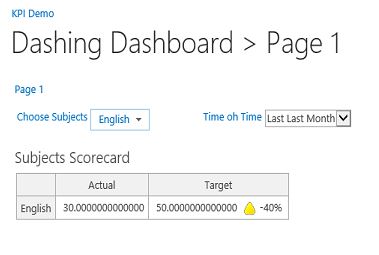
7. Access the dashboard. The dashboard with filter will look like below.


1. Scorecard named "Subjects Scorecard" with a list if KPIs called "English" and "Computer Science".

2. Filter called "Choose Subjects"

Lets see how we can connect the filter to the scorecard.
1. As you may have already know, we need to create a dashboard page first.
2. Then add the filter and scorecard into the dashboard page
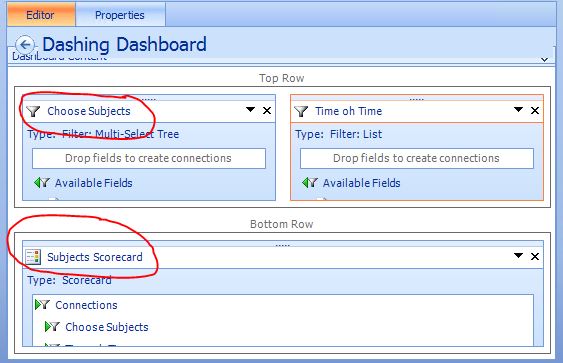
3. Next step is to create connection between them Click on the triangle arrow of the filter part and choose Create Connection.

4. You will be presented with the Connection window as below. On the Items tab, choose the scorecard name for Send values to

5. Then click on the Values tab. Choose the dropdown values as shown below. Click OK.

6. Save and Publish the dashboard.
7. Access the dashboard. The dashboard with filter will look like below.

Subscribe to:
Posts (Atom)